Hardware Reviews: HP iPaq 5450 PDA
|
Wi-Fi will definitely become a a standard feature for PDAs in the next
years. HP recently
released the first PDA featuring built-in Wi-Fi which gives us a idea
what the future of PDAs could
look like.
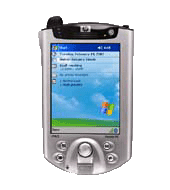
HP's iPAQ H5450 is the latest and most advanced Pocket PC PDA available
on the market. It features Wireless
connectivity through built-in Wireless LAN (802.11b) and
Bluetooth adapters. Other highlights are
biometric identification (fingerprint reader), a bright high-resolution
LCD display and a 400 MHz
XScale CPU.
| 
|
1. Device
Like all other iPAQ devices, the 5450 is not a PDA which you can carry
around in your shirt-pocket.
It looks very similar to the iPAQ 3900 series, the curvy design makes
it look smaller than it is. The reason
for the size of the 5450 is definitely the number of features which
have been included. The 5450 is
a sophisticated high-end device targeted to the demanding business user
who doesn't care too much about the high price.
The iPAQ comes with a USB/Serial Cradle, a CD full of software
(including ActiveSync, Outlook) and a slip case
with a protective screen cover.
2. Pocket Windows
The device is running Microsoft's Pocket PC 2002 operating system,
which includes Pocket Word and Pocket Excel
as well as synchronization with a PC using Microsoft's Active Sync
technology. We tested synchronization with
a Dell Laptop computer, connecting the cradle through USB and the
serial port. It took us quite some time to get
Active Sync to work. Somehow it didn't recognize the device on the USB
port, but in the end it worked with the serial
port connection. The USB connection would allow to charge the device
while connected to a computer. This leads us
to the first issue with the iPAQ 5450: the PDA's software is often
buggy and immature.
3. WLAN/ Wi-Fi
Our main interest for testing was the wireless LAN functionality of the
device. By default, Wi-Fi is turned off
for a good reason. Power consumption of the 5450 doubles when Wi-Fi is
turned on! When trying to turn of Wi-Fi
we got the message: "Not enough memory. Please reset your iPAQ.". We
would see this message many more times later on,
also when using the Bluetooth features. The quality of the software
drivers for the wireless functions of the device
definitely needs to be improved by HP. This will be possible with a
software update and we expect HP offer a service
pack for the 5450 very soon. Setting up a Internet connection using a
wireless Hotspot worked perfectly. No configuration
settings were necessary when only one access point was in reach of the
device. It would connect immediately and we were
able to surf the Internet with Pocket Internet Explorer or download our
e-Mails with the mail client. The screen resolution
of 240x320 pixels still makes surfing the Internet difficult. For
normal websites the device will only display a small
area of the page and the user has to scroll horizontally and vertically
in order to read the whole content. Pages in XHTML
format are designed for small screen devices and allow easy navigation.
Many news portals have been adapted to feature XHTML
content, which makes reading news on a PDA a great experience.
4. Battery
The iPAQ 5450 allows exchanging the battery while the device is running
(is has a small extra-battery which should give you enough
time to exchange the battery without losing data). This feature is
important, because the PDA's battery won't last for more
than 2 hours with Wi-Fi turned on. 2 hours is a very short time
considering that people might spend quite some time reading news
on the Internet and the Wi-Fi module usually stays on after connecting
to a access point. With small battery, the usability of
the iPAQ for a field where constant Wi-Fi connectivity is required is
quite poor. The only reasonable usage of Wi-Fi with the device
is downloading and sending e-Mails or synchronizing business data. But
never forget to turn off the Wi-Fi feature after having completed
the synchronization, it will give you more battery time.
5. Speed
Microsoft Pocket PC 2002 is a modern operating system, it supports a
whole lot of media formats, allows many programs to run
concurrently and is very well integrated with the desktop versions of
Microsoft Windows. But compared to a 10 years old Palm Pilot, the PDA
somehow feels slow. When pointing on the touchscreen quite often the
system will require more than a second to react and it won't
even show that the system is processing the event already. This might
make you tip on the button onve more which will result in
multiple events being processed as soon as the system starts reacting
to the events.
6. Conclusion
From our point of view, despite of a lot restrictions in the current
version, the iPAQ leads the way to the future of PDAs. It also
contains a slot for a SIM card (undocumented), a speaker and a
microphone, which could make it upgradeable to a smart phone. As soon
as the manufacturers succeed to overcome the very short battery
lifetime and the software gets more mature, the PDA could get
closer to becoming the mobile communication center.
Hardware Specs:
Operating System: Microsoft Pocket PC 2002
Processor: 400MHz Intel XScale
Memory: 64 MB RAM, 48 MB ROM
Display Type: 16 bit, 64K color, 240 x 320, .24mm Dot Pitch, 3.8"
diagonal / 96mm, Transflective TFT liquid crystal display
Expansion: SD Memory Slot (Supports SD/MMC, SDIO type standard),
Optional expansion packs
Wireless Connectivity: Built in Bluetooth (1.1 compliant) and 802.11b
Audio: 3.5mm Stereo Mini Jack
Security: Biometric fingerprint reader
Battery: lithium-polymer removable/rechargeable 1250 mAh
Dimensions: (H x W x D): 5.20 x 3.32 x 0.62 in (133 x 84.2 x 15.9 mm)
Weight: 7.26 oz (206 g)
Links
|
|
| |
|